
Tired of answering the same customer questions over and over? Yeah, we get it. That’s where an AI-powered chatbot comes in. Whether it’s handling customer service requests, product info, or technical support, a smart chatbot can give users instant, accurate answers—and free up your team to focus on the stuff that really matters. Before you build, though, make sure you’re choosing a system that helps sell — not just deflect tickets. Our breakdown of chatbots vs. AI assistants covers the difference. Ready to build one? Let’s break it down step by step.
Step 1: Define Your Chatbot’s Purpose
Before jumping into code and AI models, clarify the chatbot’s role:
- What type of FAQs will it handle? Customer service, healthcare, e-commerce, IT support?
- Where will it be deployed? Website, mobile app, WhatsApp, Slack, or all of the above?
- Will it support multiple languages? If your audience is global, multilingual capability is a must.
Step 2: List Essential Features
A chatbot isn’t just about answering questions; it needs specific features to be truly effective.
Must-Have Features:
- Natural Language Processing (NLP): To understand user queries effectively.
- Integration with Knowledge Base: So it can fetch accurate responses from stored data.
- Concurrent Query Handling: Ability to manage multiple conversations at once.
- Context Retention: For seamless follow-up interactions.
Should-Have Features:
- Voice Input/Output: Enhancing accessibility and usability.
- Multilingual Support: Expanding the chatbot’s reach.
- Machine Learning Capabilities: To improve responses over time.
Could-Have Features:
- Sentiment Analysis: To detect frustration and escalate issues accordingly.
- Integration with CRM/Ticketing Systems: For enhanced customer support.
Won’t-Have (For Now):
- Advanced Conversational AI: Keep it simple for FAQs initially; you can always scale up later.
Step 3: Pick the Right Tech Stack
Your chatbot’s efficiency depends on the technology behind it. Here’s a solid stack:
- NLP Engine: OpenAI’s GPT models, Google Dialogflow, Rasa, or AWS Lex.
- Frontend UI: React.js or Vue.js (web), Flutter (mobile).
- Backend: Node.js or Python (FastAPI/Django).
- Database: PostgreSQL, MongoDB, or a vector database like Pinecone or FAISS.
- Deployment: Docker, Kubernetes (for serverless architecture).
- Integrations: Slack, WhatsApp, Facebook Messenger APIs.
Step 4: Understand the High-Level Architecture
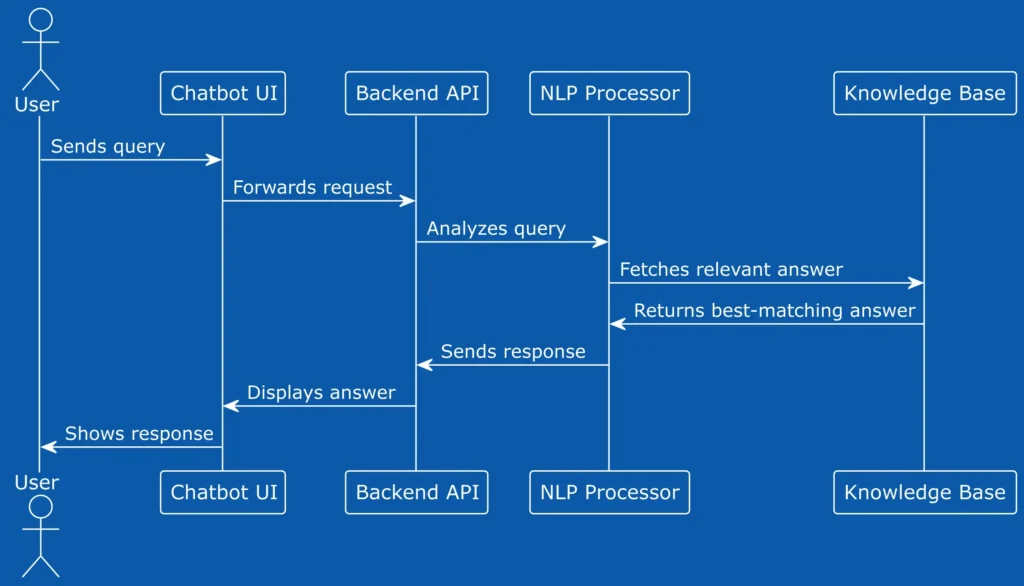
How does it all come together? Here’s a simple flow:
- User interacts via frontend (website, mobile app, or messaging platform).
- Request goes to the API backend, which acts as a bridge.
- NLP engine processes the query, understanding intent and context.
- Chatbot fetches a response from a knowledge base or generates one using AI.
- Response is sent back to the user via the same frontend channel.
Step 5: Training and Optimization
Building is just the beginning. Keep refining your chatbot by:
- Analyzing conversation logs to identify gaps in responses.
- Fine-tuning the NLP model based on real interactions.
- Updating the knowledge base with new FAQs.
- Using machine learning to improve response accuracy over time.
Smarter Conversations Start Here
Creating an AI-powered chatbot isn’t just about automation—it’s about enhancing user experience and efficiency. By following these steps, you’ll have a robust chatbot ready to answer FAQs like a pro. If the hard part is keeping answers true to your pricing and policies, read how RAG grounds AI in your business data. So, ready to build yours?
